 Godot Cookbook
シーン管理
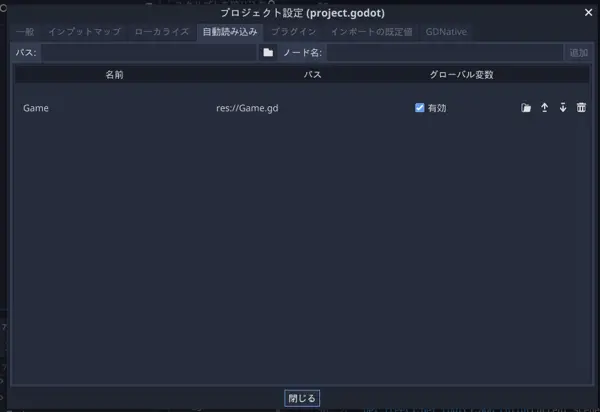
シーン管理は自動読み込みという仕組みを使います 管理するスクリプトをプロジェクト>プロジェクト設定>自動読み込みページでスクリプトを選択して名前をつけて登録することで簡単に使うことができます
シーン切り替えスクリプト
スタートシーンからメインシーンへの遷移を作成します
res://Game.tscnを作成します
extends Node

var current_scene = null

func goto_scene(scene):
	call_deferred("async_goto_scene", scene)

func async_goto_scene(scene):
	if current_scene:
  	current_scene.free()
  var s = ResourceLoader.load(scene)
  current_scene = s.instance()
  get_tree().get_root().add_child(current_scene)
  get_tree().set_current_scene(current_scene)
call_deferredはアイドル時間に呼ばれる関数です
GlobalにGameクラスを登録したのでシーンの中で呼びます
スタートシーン
res://scenes/Start.tscn
[gd_scene load_steps=2 format=2]

[ext_resource path="res://scenes/Start.gd" type="Script" id=1]

[node name="Control" type="Node"]
script = ExtResource( 1 )

[node name="Button" type="Button" parent="."]
margin_left = 474.0
margin_top = 290.0
margin_right = 549.0
margin_bottom = 310.0
text = "goto Main"
res://scenes/Start.gd
extends Node

onready var button = $Button
var next = "res://scenes/Main.tscn"

func _ready():
	button.connect("pressed", self, "goto")

func goto():
	Game.goto_scene(next)
メインシーン
res://scenes/Main.tscn
[gd_scene load_steps=2 format=2]

[ext_resource path="res://scenes/Main.gd" type="Script" id=1]

[node name="Control" type="Node"]
script = ExtResource( 1 )

[node name="Button" type="Button" parent="."]
margin_left = 475.0
margin_top = 290.0
margin_right = 548.0
margin_bottom = 310.0
text = "goto Start"
res://scenes/Main.gd
extends Node

onready var button = $Button
var next = "res://scenes/Start.tscn"

func _ready():
	button.connect("pressed", self, "goto")

func goto():
	Game.goto_scene(next)
スタートシーンから始まるようにする
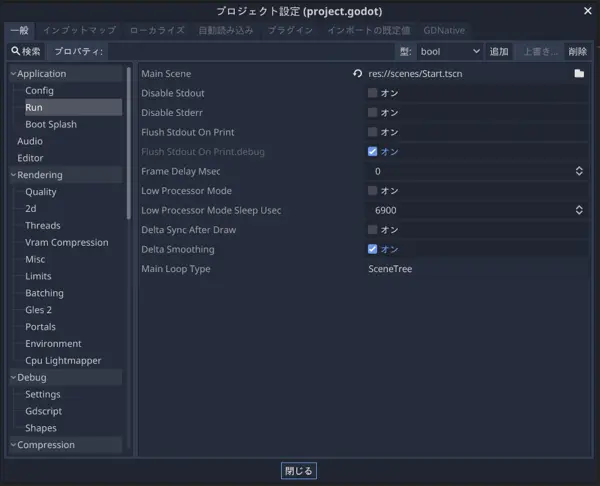
Application>Run>Main Sceneにスタートシーンを設定します
実行
これで再生ボタンを押せばシーンが切り替わったはずです